

Section Overview: Prototyping an Inventory
In this section, we will walk through the process of building a simple inventory screen for an RPG game using Gameface UI.
This walkthrough covers the core layout and component principles of Gameface UI, showing you how to leverage the boilerplate to move fast without manually writing complex CSS and HTML for every box on the screen.
We believe the true power of Gameface UI lies in its ability to facilitate rapid prototyping and quickly test design layouts. For that reason, we are diving into a hands-on build rather than providing a dry explanation of the features.
What We Will Build
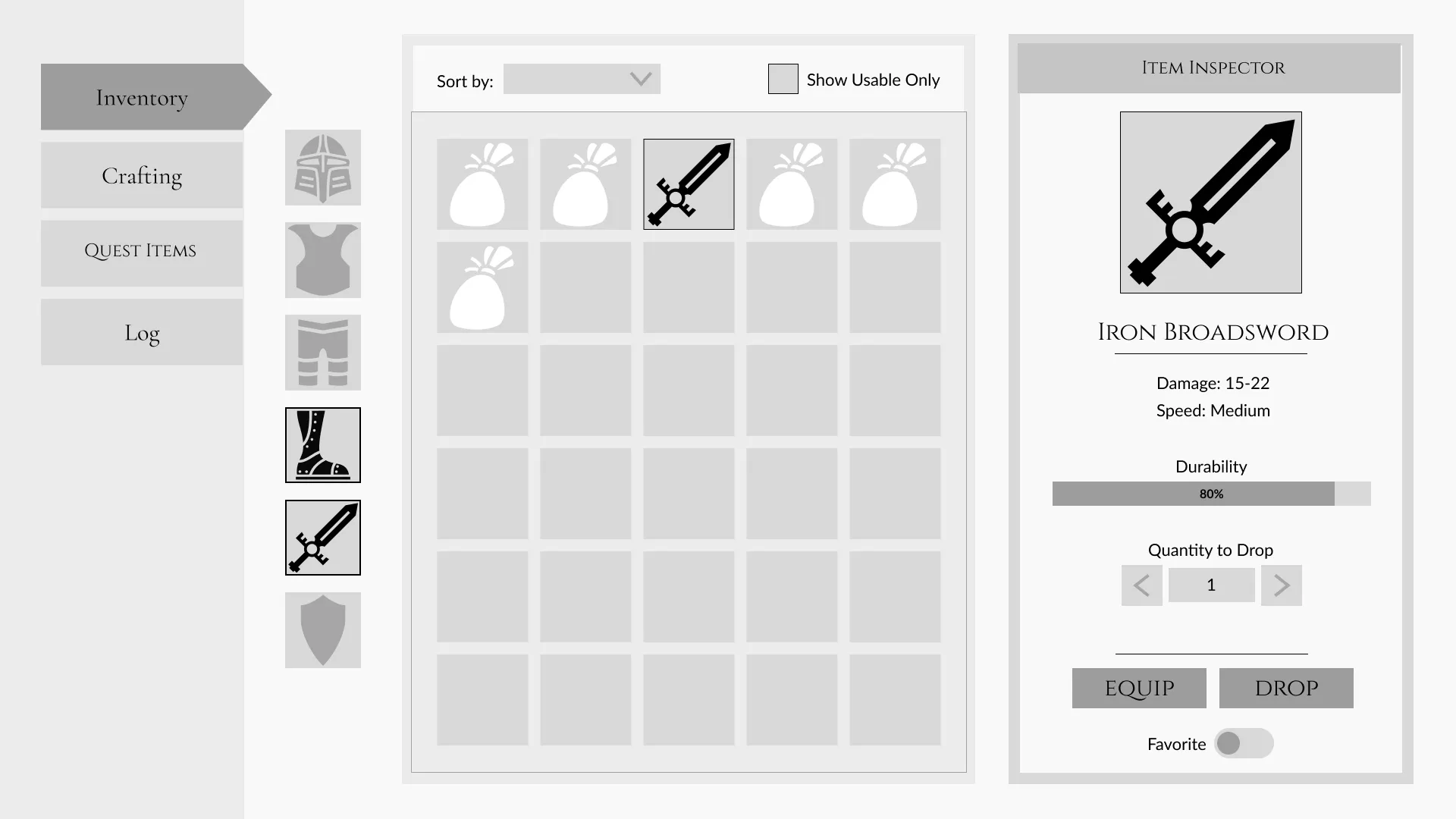
Section titled “What We Will Build”For this walkthrough, we will build a simple inventory screen for an RPG game . The screen will consist of three main panels:
- A left navigation panel with tabs for different menu categories.
- A center panel displaying a grid of item slots.
- A right panel showing detailed information about the selected item, including its name, description, and stats.
We will prototype the wireframe below:
Core Concepts We Will Cover
Section titled “Core Concepts We Will Cover”Instead of manually writing complex CSS and HTML for every box on the screen, this walkthrough will show you how to leverage the boilerplate to move quickly from design to implementation.
Throughout this process, you will learn how to:
- Structure Scalable Layouts: Use Gameface UI’s Layout components to quickly structure the prototype.
- Generate Grids: Use the
<Grid>component to automatically generate the item slots in the center panel. - Use & Customize Pre-built Components: Utilize our component library to simplify adding fully functional components like the dropdown and checkbox, and adjust their default styles to fit the look.
- Add Frontend State: Wire up basic active states for some elements.
- Write Reusable Styles: Use the built-in SASS CSS library to customize the look of our prototype and reuse styles.
- Reuse Logic: Take repeatable logic and make a reusable custom component .
- Manage Assets: Properly load custom fonts and UI SVG icons using Vite’s asset pipeline.
Project assets
Section titled “Project assets”To follow along with this walkthrough, download the provided starter assets, which include the necessary font and SVG icons. Extract the contents into your project’s src/assets/ directory.
© 2026 Coherent Labs. All rights reserved.