

Three UIs Built with an Agent
We ran the toolchain from this chapter against three jobs of very different shapes: one screen added to a project that already existed, a family of chart components, and a finished design turned into a complete interface.
The results came out uneven in the same direction every time. Structure and behavior arrived in far better shape than visual judgment.
The Three Builds
Section titled “The Three Builds”The three jobs stress different things. Adding one screen to a live project places the agent inside constraints somebody else set. A component family is large enough that early decisions bind everything built afterwards, across many separate sessions that each start with no memory of the last. A whole interface tests whether a visual language holds across screens, and that was where we expected the most trouble.
Match Tactics: A Screen in an Existing Dashboard
Section titled “Match Tactics: A Screen in an Existing Dashboard”Match Tactics is a positional tactics board that had to fit a fixed 2x2 tile of a manager-game dashboard, next to a Roster screen already living there. Players are dragged between pitch positions, a bench, and a scrolling squad list.
We picked it because the conditions were close to ideal. A design system was already in place: a variables file with named colors, a radius scale, and a shared glow-border style used across the dashboard. The neighboring screen was available to imitate. We drew a mockup ourselves and ran a Conductor pass, so the interactions, empty states, and squad-list size were written down and signed off before any code existed.
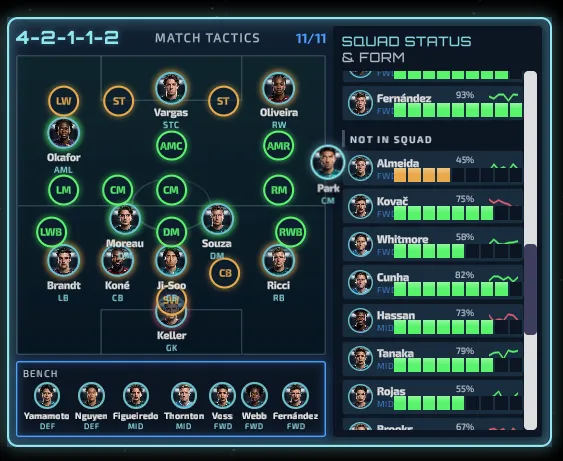
The first pass produced a working board. Twenty-five named role slots sit banded across the pitch, eleven occupied at a time, and the rest light up as drop targets only during a drag. A drop lands in the nearest slot, and dragging a defender over an attacking position styles that slot differently from a natural fit, so the mismatch is visible before release. The agent also derived the formation label from the filled positions rather than storing it separately, which was its own decision and a sound one.
A second pass fixed the visual details, along with something we had not thought to check: the new screen had broken the dashboard around it.
Chart: A Component Family
Section titled “Chart: A Component Family”The Chart work covers six types (pie, donut, bar, line, area, and spider) that share one data format, one default palette, and the same underlying code, so every type behaves identically when the data changes.
We picked it because it is the opposite of a single screen. The six types are not
six separate components. They sit on shared files, so a decision about how
animation works, or how hovering resolves to a data point, applies to all of them
at once and is expensive to revisit. Each session starts without the reasoning
behind the existing code, so we wanted to establish what it takes to stop an agent
reversing a settled decision without noticing. Our answer was a specification kept
in the repository at .specs/components/chart.md, reviewed by a person, and
updated whenever reality disagreed with it.
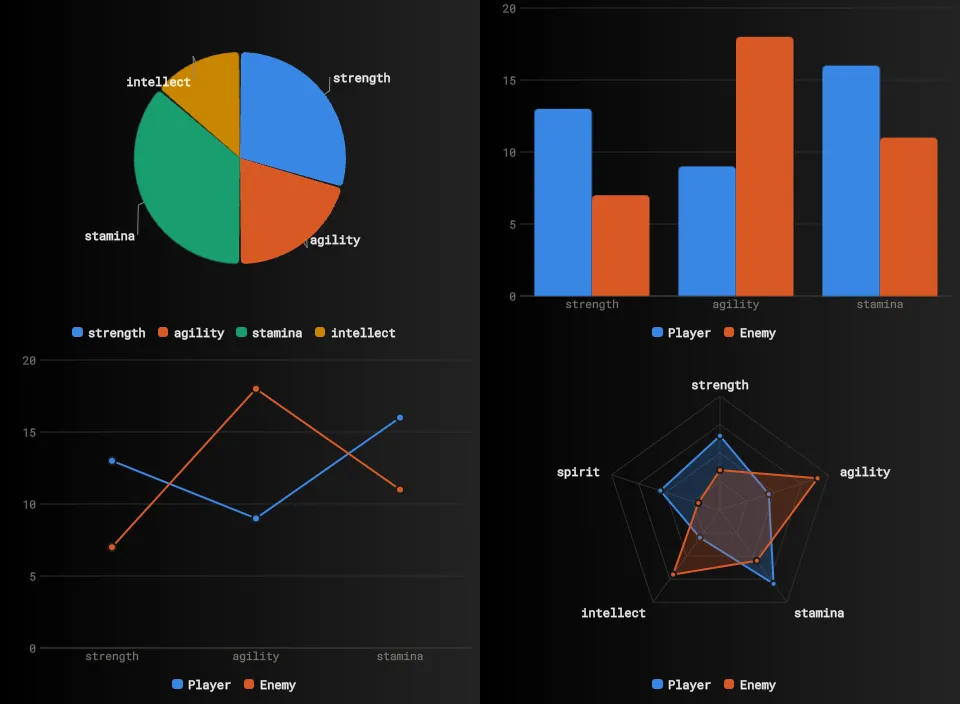
All six types landed across six delivery phases. Each phase ended with a complete component rather than a layer of scaffolding, and with the automated tests passing. That test suite grew from 29 checks to 52, and it supplied the discipline, because a phase counted as done when the tests passed rather than when the agent reported the feature working.
RPG Interface: Eight Screens From a Design
Section titled “RPG Interface: Eight Screens From a Design”The third test was eight screens of an RPG interface, art-directed as an illuminated manuscript where every panel is a page of the same book: title, HUD, character and inventory, quest journal, world map, skill tree, settings, and bestiary.
The design came out of Claude Design as a set of 1920x1080 artboards, with a written handoff covering colors, typography, spacing and geometry, six recurring decorative elements, and a specification per screen. An agent then built all eight screens as one view on the Gameface UI boilerplate. We ran it to answer one question: does a visual language survive across eight screens when an agent does the work?
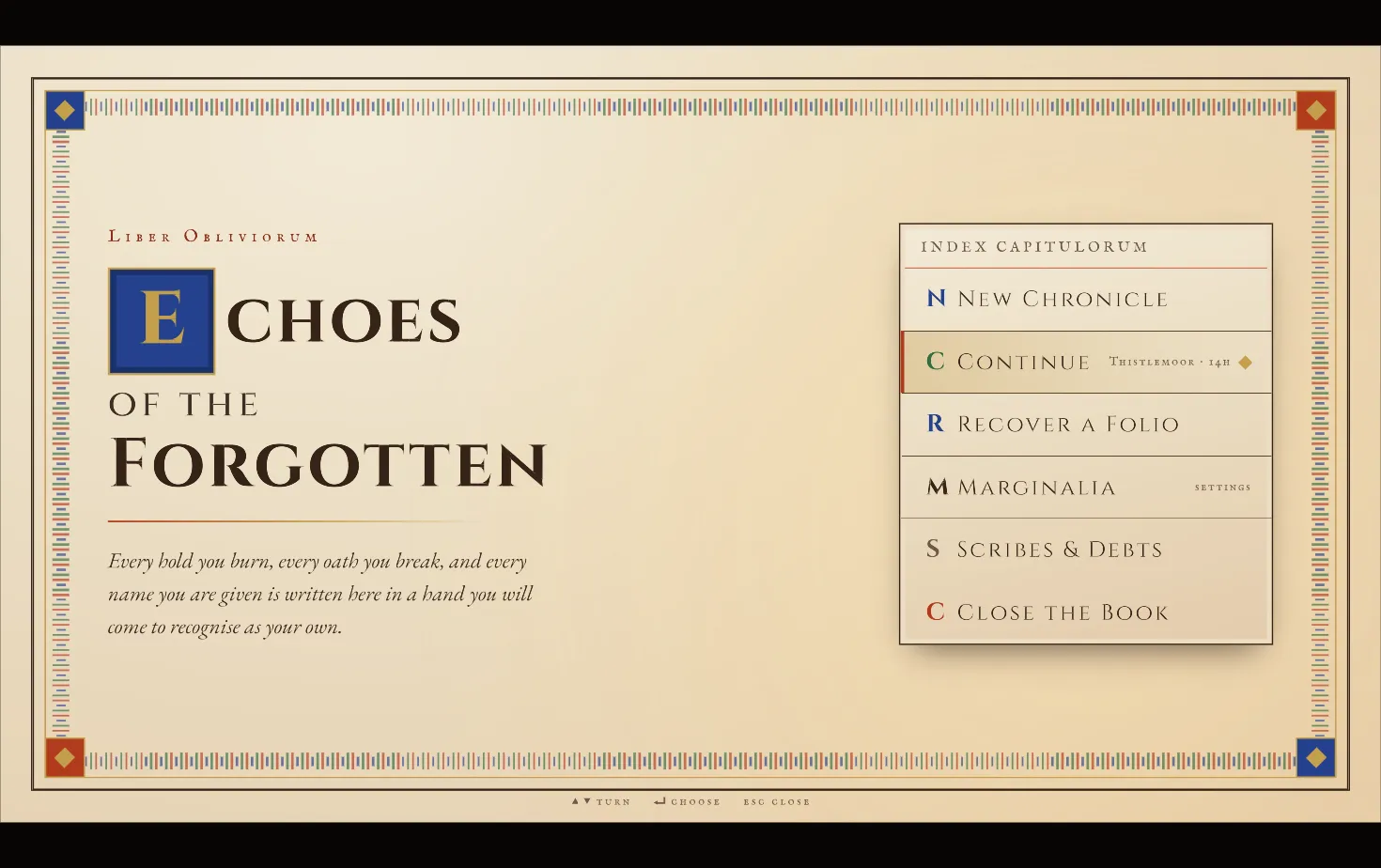
It survived. A title page and a constellation skill tree have almost nothing in common, and both still read as pages of the same book.
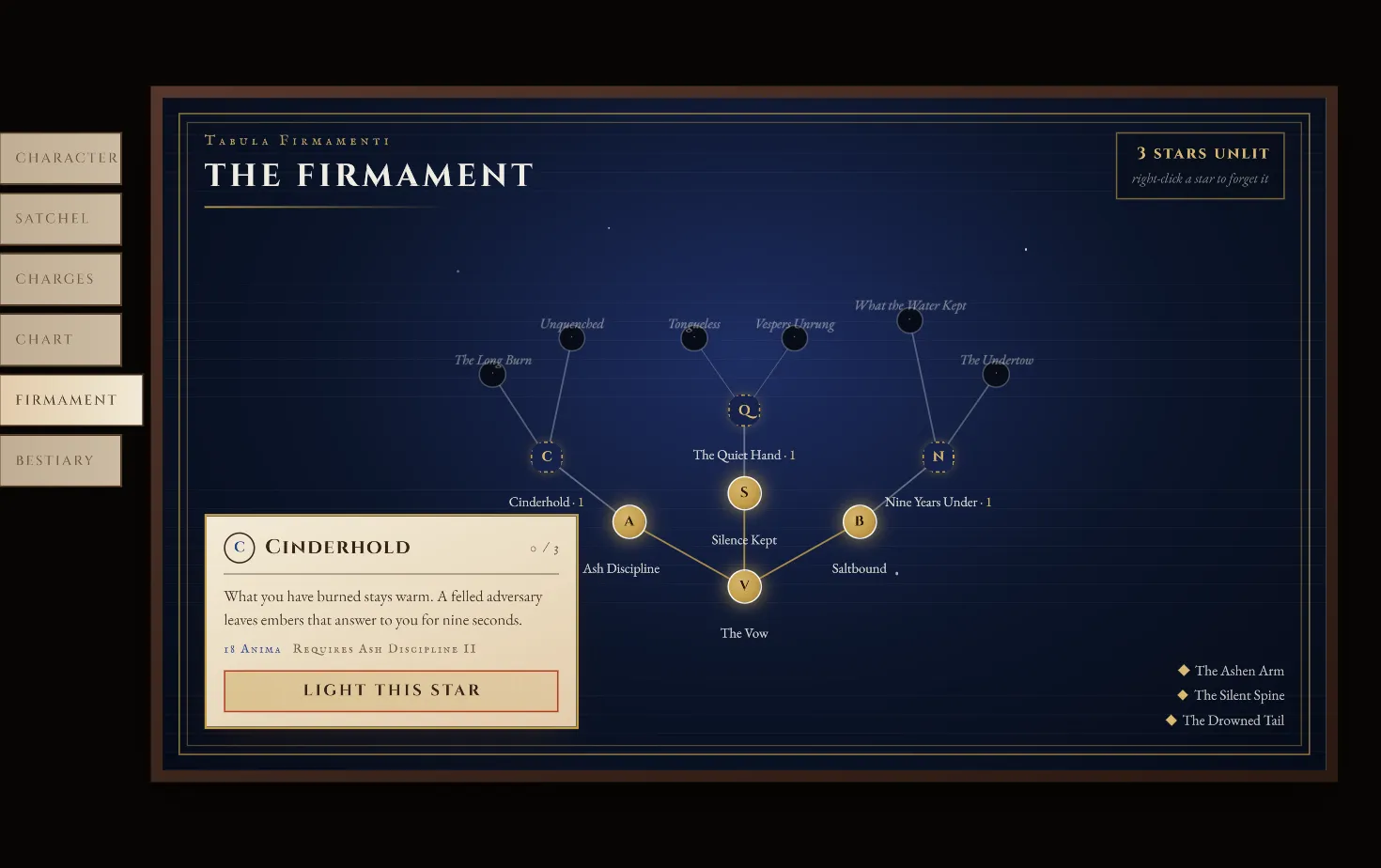
The boundaries matter here. Every illustration is a deliberate placeholder sized for real art. The decorative elements are drawn by the engine at runtime rather than authored as images, which suits a prototype and is not what we would recommend for a shipping build. Nothing was profiled under game load or localized.
Findings
Section titled “Findings”Design Input Determines the Visual Outcome
Section titled “Design Input Determines the Visual Outcome”This was the strongest signal across all three builds, and the reason Design First sits where it does in this chapter.
The RPG interface held together over eight screens because a document made the decisions first, and because those decisions were closed rather than open. Corners are square everywhere except circles. Exactly two kinds of shadow, with no colored glows except gold on unlocked skill nodes. Vermilion means danger, gold means earned, and gold never appears as decoration. Rules that specific leave nothing to drift toward.
Match Tactics had a design system but only a mockup for the screen itself, and that is precisely where it needed a second pass. The Chart work had no visual design at all and did not suffer for it, since charts are geometry rather than art direction.
Behavior Against Appearance
Section titled “Behavior Against Appearance”Match Tactics shows this most clearly, since it is the one we handed a mockup rather than a finished design. Drag and drop, drop-target highlighting, and derived values all came back reasonable on the first attempt, and the layout, structure and hierarchy of the mockup transferred well.
Precision was the weak point. The center circle on the tactics pitch was sized as a percentage of its container, so it rendered as an oval. Rows in the squad list placed the name, the condition bar and the percentage as three separately positioned elements instead of one row sharing a baseline. Both fixes took a minute, and no automated check could have caught either, because “this oval was supposed to be a circle” is not a measurable property.
Budget a visual pass as a normal step and treat the first result as a structurally correct draft.
Token Use Drops Off for Trim
Section titled “Token Use Drops Off for Trim”The main styling in Match Tactics followed the project’s design tokens. The scrollbar arrived at its default appearance while everything around it followed the dashboard’s visual language, and when the second pass styled it, the agent wrote the color as a raw hex value. That exact color already had a name in the same project’s token file.
An agent that treats a detail as incidental writes a literal value rather than using the token for it, even with the token file present in the same project. Search for raw hex colors before accepting a screen.
Agent Checks Only Look Inward
Section titled “Agent Checks Only Look Inward”Our most instructive failure occurred outside the screen entirely.
The agent added a setting to the Match Tactics board that blocked mouse input from reaching the dashboard underneath, so the tile could no longer be dragged or resized. Every check it ran passed, because every check examined only the screen it had just built. The fix was to pass input through by default and swallow it only on the player tokens being dragged.
Automated checks examine the thing under construction. None of them detect that something which used to work has stopped. Drive the surrounding application by hand after any addition to it.
The Documents Outlasted the Code
Section titled “The Documents Outlasted the Code”We have reused two artifacts from these builds more than anything else, and both are documents rather than code.
The first is a table in the Chart spec recording how the engine behaved when the agent tested it directly, rather than what the documentation states. It records that querying the size of a shape inside an SVG returns zero, that simulated mouse events arrive without coordinates attached, and that the usual method of triggering a click from code does not exist. None of that appears in any documentation, ours included.
The second is the RPG project’s table of substitutions, listing every piece of CSS the design called for that Gameface does not support, alongside its replacement. Modern color notation converted to plain RGB. Inner shadows rebuilt as an extra element behind the frame. Repeating stripe patterns rebuilt as a single repeating tile. Grid layouts rebuilt as wrapping rows.
Both exist because an agent was instructed to verify rather than assume, and because somebody recorded the results where the next session would read them. Request this explicitly on any work large enough to span several sessions.
Confident and Persistent Misdiagnosis
Section titled “Confident and Persistent Misdiagnosis”The Chart work lost most of a delivery phase to an invisible layer that collapsed to nothing, but only in the packaged build rather than during development. The tool that compresses CSS for release had rewritten four separate position values into a single shorthand that Gameface does not support. The agent blamed scrolling, then coordinate timing, then event dispatch, each plausible, and wrote the failing test off as a problem with the test itself.
Running the tests against the packaged build instead of the development server ended it. No amount of further reasoning would have reached the cause, because the evidence did not exist in the version under test. See Verifying What the Agent Builds for where this fits in the checking order.
Numeric Budgets Rather Than Adjectives
Section titled “Numeric Budgets Rather Than Adjectives”The Chart spec set a performance budget before the first chart existed. A mark is one drawn shape in a chart: one slice of a pie, one bar in a bar chart, one point on a line. The budget allowed 200 of them, warned above 500, required the animation to update the chart once per frame regardless of mark count, and permitted measuring the chart’s size only when its container resizes rather than during drawing.
An agent holds itself to figures of that kind. An instruction to make the component fast produces agreement and nothing else.
The same pattern appears in the design rules and in the spec decisions. Closed rules outperformed open guidance in every case we tried.
© 2026 Coherent Labs. All rights reserved.